


Cart is empty


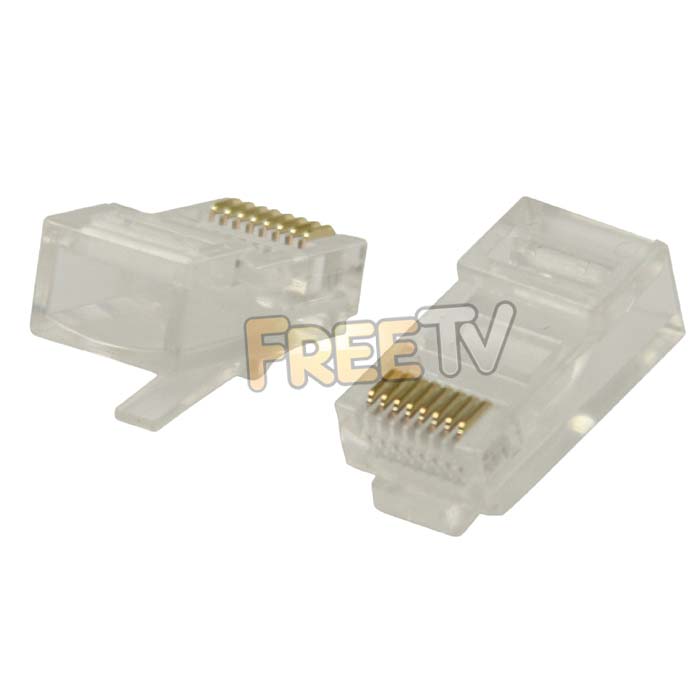

DESCRIPTION of RJ45 Connector
- RJ145 Ethernet cable Connector
- 8P8C modular plug
- Colour: Clear
- Manufacturer: Philex
- Come in Bag of 100s
- Number of Pins: 8
- CC 8536691000 0.16kg (per 100 !) N
USES of RJ45 Connector
Normally used in conjunction with 4 pair twisted cable CAT5e cable
- With connecting the ethernet on a satellite receiver to the internet
- In the computer industry for building LANs, connecting computers, printers etc into a network
Note see 'Wiring Video' tab for detailed installation guide & general info
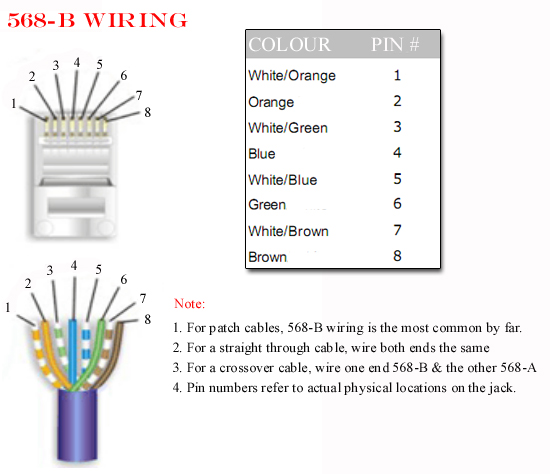
Below is documented the correct wiring format for a CAT5 Cable and detailed instruction for making a CAT5 Cable.
WIRING DIAGRAMS FOR A CAT5 CABLE
Notes
The diagram above is called a CAT5 Type B wiring method which is the one that is almost exclusively used in industry.
TO MAKE A CAT5 CABLE
Equipment needed
- Roll of CAT5 Cable
- RJ45 CRIMPING Tool
- RJ45 Connectors * 2
Steps
- Using a crimping tool remove the outer protective sleeve leaving around 25mm of cable exposed
- Next untwist each of the pairs of cables
- Line up the wires in accordance with the wiring diagram above
- Again using the crimping tool cut the cable leaving about 12-15mm of cable exposed.
- Push the cables into the RJ45 Plug
- Use the crimping tool to crimp the RJ45 Connector on the the cable
- Cut the CAT5 cable to the required lenght
- Repeat the process to put a connector on the far end
NOTES ON CAT5 WIRING
1. 568-A wring
There is an alternate wiring convention for CAT5 cables called 568-A. See diagram below:
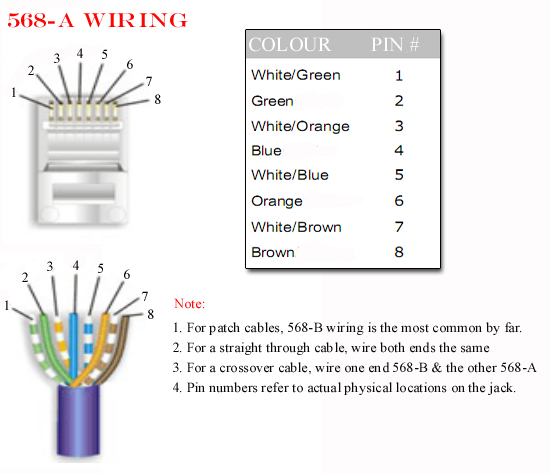
The most common use of this convention would be use a Type A & and a Type B connector to make a cross over cable.
2. Types of CAT5 Cable
- The most commonly used cat5 cable is UTP (Unshielded Twisted Pair) cable. This is suitable for homes and offices
- A more expensive option is to use FTP (Foil shielded Twisted Pair) cable
- Which gives greater interference protection when running next to power cables
We aim to provide a fast, reliable & low cost delivery service
All orders we ship, leave our warehouse on time
- Standard Courier With Fastway (2-4 Working Days)
- Cost is €3.95 on Orders Below €100
- Free Delivery on Orders Above €100
- Express Courier (1-2 Working Days)
- With Fastway: Cost is €6.50 (or €2.50 extra if you qualify for free standard shipping)
- With DPD: Cost is €7 (or €3 extra if you qualify for free standard shipping)
- This service guarantees that any order placed before 4.30pm with Fastway or 3pm With DPD (Mon - Fri) will ship from our depot that same day on the express delivery service*
- *Orders placed after 4.30pm with Fastway or 3pm with DPD on Fridays & during weekends / bank holidays will be shipped the next working day
- An Post
- Cost is €2.50 (P & P)
- Available only on selected products with the An Post logo
- Small Parcels
- Cost is €3.50
- Available only on products with the small parcels logo**
- Great Britain
- Cost is €7.50
- Western Europe
- Cost is €10
- Belgium, France, Germany, Holland, Italy, Lithuania, Luxembourg, Spain, Portugal etc..
- Rest of Europe
- Cost is €20
- Croatia, Czech Republic, Estonia, Iceland, Malta, Slovenia, Switzerland, Norway, Sweden, Finland etc..
- Rest of World
- Cost is €30
- Please contact us before purchasing to confirm
Terms
- All shipping fee prices listed are ex-VAT @ 23%
- Irish shipping rates apply to the whole Island (North & South)
- Shipping fee is fixed for an order, regardless of the number of items bought
- All courier orders require signed proof of delivery and the customer must be contactable by phone
- We do not offer a weekend delivery service (Mon-Fri only excluding bank holidays)
- *Our courier achieves a 98% success rate on express deliveries
- ** Applies to island of Ireland only (North & South)
- Heavy or Large Parcels (Applies only to Non Irish or UK customers): It may be necessary to charge higher shipping fees / offer option to cancel order



